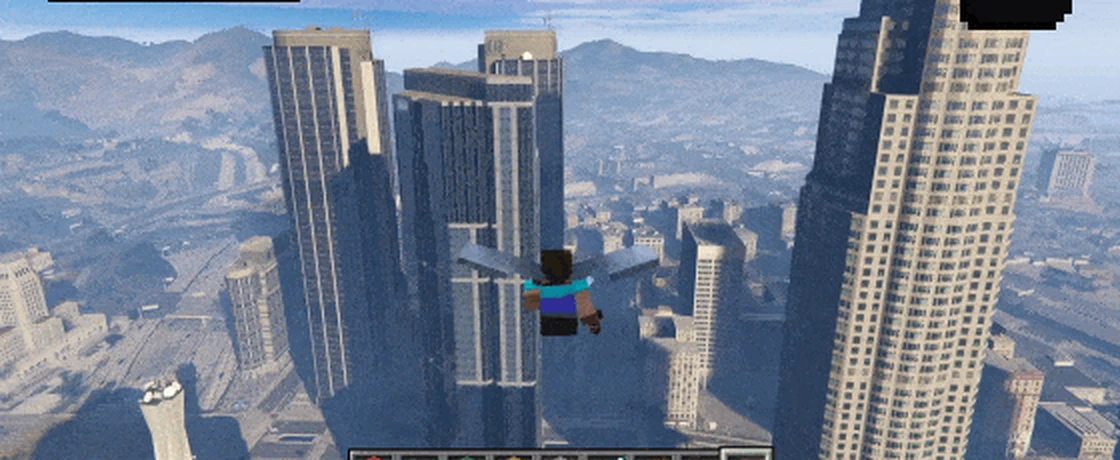
A frame from the official game showcase. Minecraft is rendered into the GTA V world.
The idea
A Fabric mod, a ScriptHookV plugin, and a ReShade add-on connect two running games. Minecraft is composited into GTA V using color and depth, while a local WebSocket shares the camera and selected events.
What was built
- Minecraft TNT, arrows, and fireworks trigger GTA explosions and bullets.
- Minecraft mobs interact with the GTA world, including the police.
- The documented example targets GTA V story mode, not GTA Online.
The example source and original field note document the implementation. Their version requirements and limitations matter more than the headline.
How to try this example
Want to play the mod you saw in the showcase? The linked example directory is a source project with build instructions. A GitHub source ZIP is not a ready-to-install mod. A compiled release should identify its supported game and loader versions and include its own installation steps. Check the upstream Releases page for one; this guide does not list a verified precompiled package.
Minecraft × GTA V: build both sides
The README targets Windows 10/11 with WSL, GTA V Legacy on Steam, and Minecraft Java 26.3. It documents GTA build 3889, Fabric Loader 0.19.5 or newer, Fabric API 0.161.0+26.3, ReShade 6.8.0 with add-on support, JDK 25, and MSVC C++ tools. Check that ScriptHookV supports your installed GTA build before continuing.
- Prepare a separate Minecraft profile. Give it its own game directory so the example’s world and option changes stay away from your normal worlds. Confirm the README’s path settings before copying files.
- Build the Minecraft mod. From the example’s mc directory, run ./gradlew build with JDK 25. The documented output is mc/build/libs/passthrough-0.1.0.jar; put the built JAR and the matching Fabric API in that profile’s mods folder.
- Build and install the GTA components. Follow the README’s GTA-side dependency, MSVC build, and installation steps for the ASI plugin and ReShade add-on. Check the target game directory and existing loader files first; keep the documented removal procedure available.
- Test in story mode. Follow the documented launch sequence with both games running; F7 toggles the passthrough. Use GTA story mode only, never GTA Online. GTA Enhanced is not supported by this example, and the field note does not verify other GTA builds, non-NVIDIA GPUs, or other ultrawide setups.
Check the example README for the full build and installation procedure, and the field note for the documented test setup and limitations. These instructions describe the reviewed source; they do not guarantee compatibility with your installation. If a version or dependency is unclear, verify it in the project documentation before changing game files.
Explore a similar idea
Have your agent inspect the game you own and read the example before proposing a plan. Start with a smaller change if this is your first mod.
Inspect my GTA V story-mode install and Minecraft Java install. Search the knowledge base for the Minecraft passthrough field note. Explain the required versions and loaders before changing anything.This page summarizes work documented in the official repository. We have not independently tested the mod. All game names and game imagery belong to their respective owners.